The Website import feature in the "Add Knowledge Sources" modal enables you to train your AI agent using content directly from live web pages. Whether you need to import an entire site structure or just a few specific landing pages, this interface gives you granular control over the data ingestion process.
Source Name
Assign a custom name (e.g., "Company Knowledge Base") to categorize this data source.
Source
Choose "Website" option from the available source options in the tab menu.
Website URL
Enter the URL of the webpage you want to train.
Crawl Scope
Select the method that fits your needs:
Automatically crawl the website If Import all pages is selected, the system discovers content for you. You can then refine the results:
/blog/*) to prevent irrelevant sections of the site from being imported.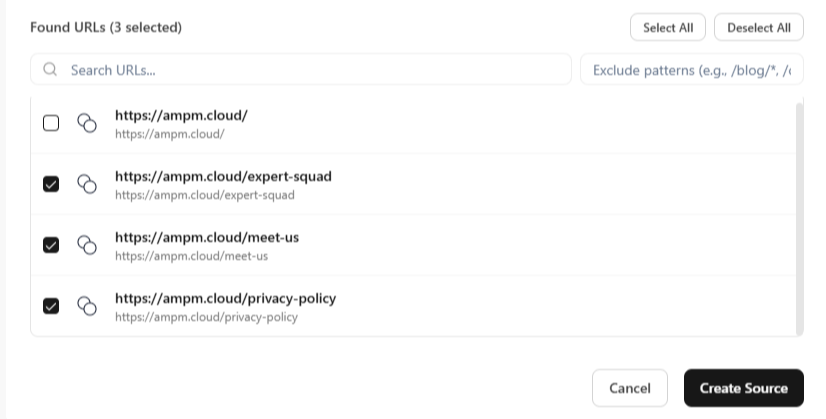
When Individual pages is selected, you have direct control over exact inputs:
https://ampm.cloud/test1) directly into the input fields.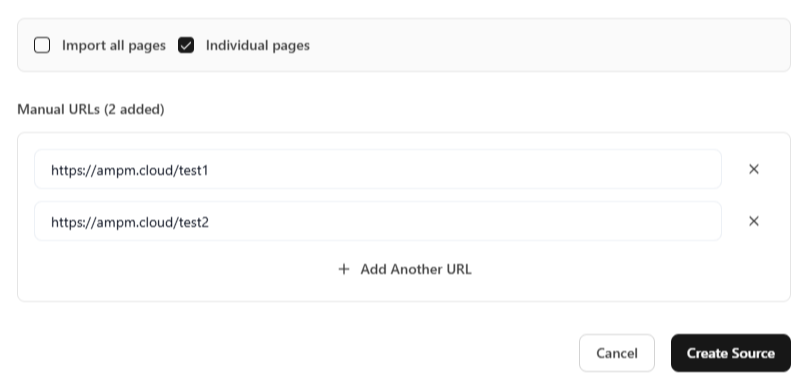
Once you have completed the steps mentioned above, click the Create Source button at the bottom right of the modal to save the entry.
Important: Simply creating a source does not immediately train the agent. After adding all your desired sources (websites, documents, or text), you must click the Train Agent button on the builder page. This triggers the system to process the new data and apply it to your agent's active knowledge base.
Start building intelligent AI agents to engage with customers.