7en.ai

Navigation

Getting Started

IntroductionQuick Start Guide

BUILD AGENT

Basic SettingsModel SettingsAppearanceGuidelinesEscalationChat Integration

Agent Training

Using DocumentsUsing Google DriveUsing Plain TextUsing URLs

Manage Knowledge

Knowledge FolderManage Sources

integrations

FreshdeskSlackZapierZendeskZoho

Getting Started

IntroductionQuick Start Guide

BUILD AGENT

Basic SettingsModel SettingsAppearanceGuidelinesEscalationChat Integration

Agent Training

Using DocumentsUsing Google DriveUsing Plain TextUsing URLs

Manage Knowledge

Knowledge FolderManage Sources

integrations

FreshdeskSlackZapierZendeskZoho

Manage Sources

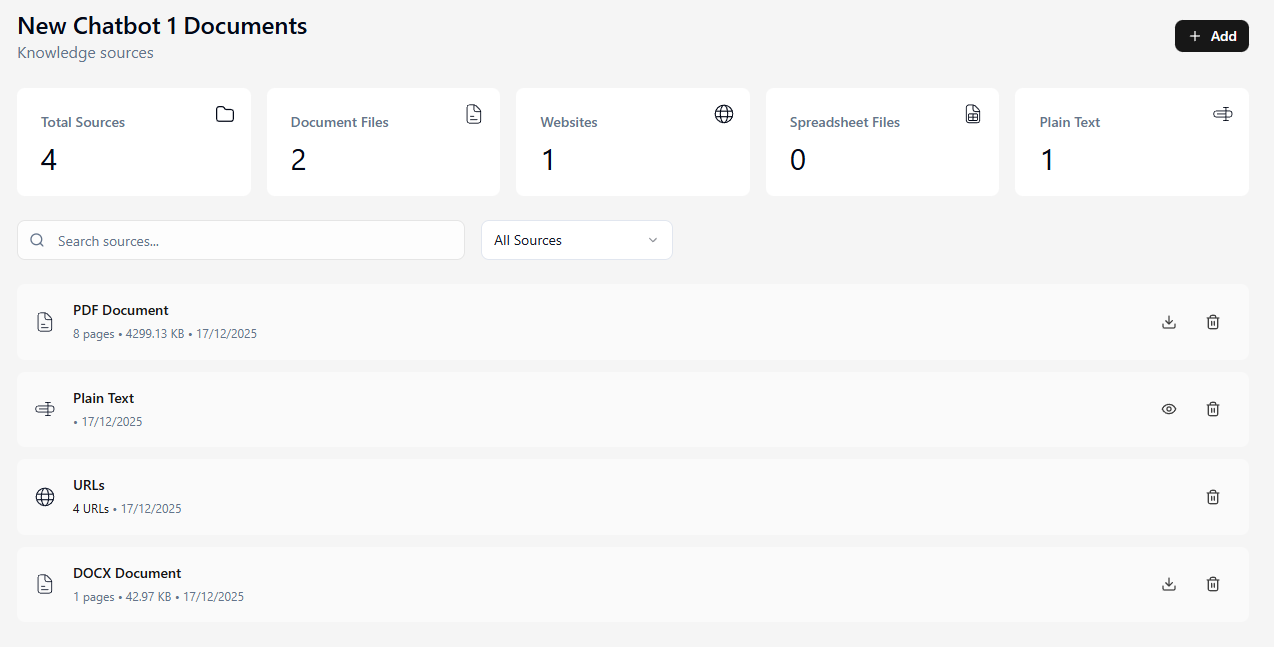
Inside a specific folder, you have full control over the individual files and links that the agent uses to generate answers.

Source Overview
The top dashboard provides a quick snapshot of the agent's brain:

  • Total Sources: The aggregate count of all training items.
  • Type Breakdown: View distinct counts for Document Files, Websites, and Plain Text entries.

Search & Filter

  • Search Bar: Quickly locate specific documents by filename.
  • Filter Dropdown: Use the All Sources dropdown to view only specific file types (e.g., Documents) to narrow down your list.

File Actions
Each source in the list includes direct management actions:

  • Download: Click the Download icon to retrieve a local copy of the uploaded file for verification.
  • Delete: Click the Trash Can icon to permanently remove a source. This is useful for removing outdated policies or incorrect URLs.

Please retrain agent by clicking Train agent button in builder page after you delete your sources.
Adding New Source

  • Add Button: To train the agent on new information, click the + Add button at the top right. This opens the standard "Add Knowledge Sources" modal, allowing you to upload files, crawl websites, or integrate Drive files just as you do in the builder.
Document list

Ready to transform your business?

Start building intelligent AI agents to engage with customers.

← Knowledge Folder
Freshdesk →

On this page

  • Manage Sources